Imagine this: you’re in the middle of an epic game, your reflexes are sharp, and victory is within reach. Suddenly, your mouse lags, or the cord gets tangled, pulling you out of the zone. Frustrating, right? Many gamers face this problem, especially when they want the freedom of wireless without breaking the bank.
Choosing a budget wireless gaming mouse can feel like navigating a maze. You want something that feels good in your hand, responds quickly, and lasts through long gaming sessions. But with so many choices, how do you know which one is truly worth your money? It’s easy to get confused by all the different features and prices.
That’s where we come in! This guide is designed to help you find the perfect budget wireless gaming mouse. We’ll break down what really matters, so you can stop worrying about bad connections and start enjoying smooth, lag-free gameplay. Get ready to discover mice that offer great performance without a high price tag.
Our Top 5 Budget Wireless Gaming Mouse Recommendations at a Glance
Top 5 Budget Wireless Gaming Mouse Detailed Reviews
1. Logitech G305 Lightspeed Wireless Gaming Mouse

Rating: 8.6/10
The Logitech G305 Lightspeed Wireless Gaming Mouse is a fantastic choice for gamers who want speed and accuracy without the hassle of wires. Its lightweight design and powerful HERO sensor make it a joy to use, whether you’re in a fast-paced shooter or exploring a vast open world.
What We Like:
- It’s super light! Weighing only 99 grams, it’s easy to move around quickly for fast gaming.
- The wireless connection is lightning fast. You won’t notice any lag, so your actions happen right when you want them to.
- The HERO sensor is amazing. It’s super accurate and can track your movements at speeds over 400 inches per second.
- You can play for a really long time on one battery. It lasts up to 250 hours, so you don’t have to worry about it dying mid-game.
- It has six buttons you can program to do whatever you need them to do.
- It’s easy to take with you thanks to its compact size and a place to store the wireless receiver.
What Could Be Improved:
- The scroll wheel can feel a little stiff for some users.
- It only uses one AA battery. Some gamers might prefer a rechargeable battery.
This mouse offers incredible wireless performance and accuracy at a great price. It’s a solid option for anyone looking to upgrade their gaming setup without breaking the bank.
2. FFJ Wireless Gaming Mouse

Rating: 8.6/10
Get ready to level up your gaming with the FFJ Wireless Gaming Mouse. This mouse is packed with features to give you an edge in any game. It’s designed for comfort and performance, making it a great choice for gamers of all levels.
What We Like:
- You can program all 6 buttons with custom macros and settings using the driver software.
- The DPI can be adjusted from 50 all the way up to a super-sharp 24000, and the polling rate is also adjustable for smooth gameplay.
- It has 6 cool RGB lighting modes to create your perfect gaming atmosphere, with millions of colors to choose from.
- The battery lasts a really long time, up to 75 hours with the lights off, and it charges up in just 1.5 hours.
- You can connect it in three different ways: 2.4G wireless, USB-C wired, or Bluetooth 5.3, and it works with almost any device like PCs, Macs, and even gaming consoles.
- The ergonomic design makes it comfortable for long gaming sessions, and the buttons are built to last for millions of clicks.
What Could Be Improved:
- While the 24000 DPI is impressive, most gamers might not need such a high setting, making it potentially overkill for some.
- The driver software, while powerful, might require a bit of a learning curve for beginners to fully utilize all its features.
This FFJ wireless gaming mouse offers a fantastic blend of customization, performance, and battery life. It’s a versatile tool that can adapt to your gaming needs and create an awesome setup.
3. Razer Basilisk V3 X HyperSpeed Customizable Wireless Gaming Mouse: Mechanical Switches Gen-2-5G Advanced 18K Optical Sensor – Chroma RGB 9 Programmable Controls 535 Hr Battery Classic Black

Rating: 9.0/10
Level up your game with the Razer Basilisk V3 X HyperSpeed. This wireless gaming mouse offers amazing speed, comfort, and customization for serious gamers. Its classic black design looks sharp on any desk.
What We Like:
- The iconic ergonomic shape fits your hand perfectly for long gaming sessions.
- You get two ways to connect: super-fast Razer HyperSpeed Wireless or steady Bluetooth.
- Enjoy an incredible battery life, up to 535 hours on Bluetooth!
- The Razer 5G Advanced 18K Optical Sensor provides super-accurate tracking so you never miss a shot.
- Razer Mechanical Mouse Switches Gen-2 give you satisfying clicks and last for millions of games.
- Make it your own with vibrant Razer Chroma RGB lighting.
- It has 9 programmable buttons to set up your favorite commands and macros.
What Could Be Improved:
- Some gamers might prefer an even higher DPI sensor for extreme precision.
- While versatile, the Bluetooth connection might not be ideal for competitive, fast-paced games where every millisecond counts.
This mouse truly balances performance and comfort. It’s a fantastic choice for gamers who want a reliable and customizable wireless experience.
4. TECKNET Wireless Gaming Mouse Rechargeable – 8000 DPI
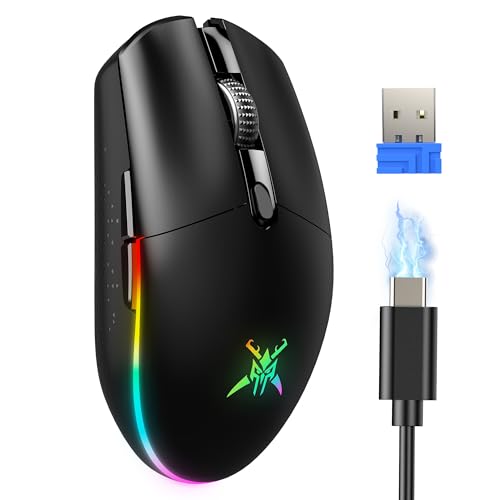
Rating: 8.5/10
The TECKNET Wireless Gaming Mouse is a powerful tool for gamers. It offers high precision, a long-lasting battery, and cool RGB lighting. This mouse works with both PCs and Macs, making it super versatile for any setup.
What We Like:
- Super accurate with adjustable DPI from 800 to 8000.
- You can connect it with 2.4G wireless or a USB-C cable for zero lag.
- It has awesome RGB lighting with 6 different modes that look cool.
- The battery lasts a super long time, up to 100 hours when the lights are off.
- It’s very light at only 72g, which is great for long gaming sessions.
- You get 6 programmable buttons for your favorite games and macros.
- The buttons are built tough and can handle over 20 million clicks.
- It works with most Windows and Mac computers.
- TECKNET offers lifetime support, so you don’t have to worry.
What Could Be Improved:
- The DPI levels might be a bit overwhelming for beginners.
- The RGB lighting modes are linked to DPI, which limits some customization.
This TECKNET gaming mouse is a solid choice for gamers who want performance and comfort without breaking the bank. Its long battery life and reliable connection make it a great companion for any gaming adventure.
5. Logitech G305 Lightspeed Wireless Gaming Mouse

Rating: 9.3/10
The Logitech G305 Lightspeed Wireless Gaming Mouse in white offers a fantastic gaming experience without the hassle of wires. Its super-fast wireless connection means your movements are instantly registered, giving you an edge in fast-paced games. The mouse is designed for comfort and precision, making it a great choice for gamers of all levels.
What We Like:
- The HERO optical sensor is amazing. It tracks every move perfectly, making your aim super accurate.
- LIGHTSPEED wireless technology is incredibly fast. It feels as responsive as a wired mouse, maybe even faster!
- You can game for a really long time on just one AA battery. It lasts up to 250 hours, which is awesome.
- The mouse is lightweight and easy to move around. Its classic shape feels comfortable in your hand for long gaming sessions.
- It’s small and easy to take with you. The USB receiver fits right inside the mouse for safekeeping.
What Could Be Improved:
- The scroll wheel clicks can be a bit loud for some people.
- While the design is classic, it doesn’t have extra buttons for more customization.
The Logitech G305 is a top-notch wireless gaming mouse that delivers on performance and battery life. It’s an excellent value for any gamer looking for a reliable and responsive wireless option.
Your Guide to a Budget Wireless Gaming Mouse
Are you looking for a gaming mouse that won’t break the bank? A budget wireless gaming mouse can offer a lot of freedom without costing too much. This guide will help you find the best one for your needs.
Why Choose a Wireless Gaming Mouse?
Wireless mice give you more space to move. You don’t have to worry about a cord getting tangled or limiting your reach. For gaming, this means smoother movements and more comfort during long sessions.
Key Features to Look For
When you’re shopping for a budget wireless gaming mouse, a few things are super important.
1. Sensor Performance (DPI and Polling Rate)
The sensor is like the mouse’s eyes. It tracks how you move it. Look for a good DPI (dots per inch). Higher DPI means the mouse moves farther on the screen with less physical movement. Most gaming mice have adjustable DPI, which is great. A polling rate tells you how often the mouse tells your computer its position. A higher polling rate (like 500Hz or 1000Hz) means more accurate and quicker responses. This is key for fast-paced games.
2. Battery Life
Since it’s wireless, you need to think about the battery. How long does it last on one charge? Some mice can last for weeks, while others might need charging every few days. Look for mice that use AA or AAA batteries if you want to easily swap them out. Rechargeable batteries are also a good option.
3. Ergonomics and Comfort
Your hand will be on the mouse for a long time. It should feel good! Look for shapes that fit your hand well. Do you hold your mouse with your palm, your fingertips, or your whole hand? Different grips need different mouse shapes. Some mice have special grips or textures to make them more comfortable.
4. Buttons and Customization
Most gaming mice have extra buttons besides the left and right clicks. These can be programmed for different game actions. Having a few extra buttons can really help you play better. Some mice let you change the DPI on the fly, which is handy.
5. Connectivity
Most budget wireless gaming mice use a USB dongle. This is a small device that plugs into your computer. Make sure the dongle is easy to store or that the mouse has a place to keep it when you’re not using it. Some newer mice might also offer Bluetooth, but USB dongles usually give a more stable connection for gaming.
Important Materials
The materials used in a mouse affect how it feels and how long it lasts.
- Plastic: Most budget mice use plastic. Look for good quality plastic that doesn’t feel cheap or slippery. Some mice have a matte finish which helps with grip.
- Rubber Grips: Some mice have rubber on the sides. This makes them easier to hold and prevents your hand from slipping, especially when things get intense.
Factors That Improve or Reduce Quality
Several things can make a budget mouse great or just okay.
- Sensor Quality: A better sensor means more accurate tracking. Cheap sensors can jump or be inconsistent.
- Build Quality: A well-built mouse feels solid. It won’t creak or feel loose.
- Wireless Technology: Some wireless tech is better than others. Lag-free wireless is important for gaming.
- Software: Some mice come with software that lets you customize buttons and lighting. Good software makes the mouse more useful.
- Weight: Some gamers prefer lighter mice for quick movements. Others like a bit more weight. Many budget mice are in a good middle ground.
User Experience and Use Cases
A budget wireless gaming mouse is perfect for many situations.
- Casual Gaming: If you play games for fun, a budget mouse is a great choice. It offers freedom and good performance for most games.
- Multi-purpose Use: You can use it for everyday tasks like browsing the web and working, and then switch to gaming without any hassle.
- Beginner Gamers: It’s a fantastic starting point for anyone new to PC gaming. You get a taste of what a gaming mouse can do without spending a lot.
- Limited Space: If you have a small desk or want to keep your setup tidy, a wireless mouse is ideal.
Frequently Asked Questions (FAQ)
Q: What is DPI and why is it important for gaming?
A: DPI stands for dots per inch. It measures how sensitive your mouse is. A higher DPI means your cursor moves faster on the screen when you move the mouse. For gaming, this helps you react quickly and aim precisely.
Q: How do I know if the wireless connection will be good enough for gaming?
A: Look for mice that mention “low latency” or “lag-free wireless.” Most budget wireless gaming mice use a USB dongle, which usually provides a very stable and fast connection.
Q: Can a budget wireless mouse be as good as a wired one?
A: Many budget wireless gaming mice are very good now. They can offer a similar performance to wired mice. The main difference is the convenience of not having a cord.
Q: How often will I need to charge a wireless gaming mouse?
A: This depends on the mouse. Some can last for weeks, while others might need charging every few days. Check the product description for battery life estimates.
Q: What does “polling rate” mean?
A: The polling rate is how often the mouse sends information to your computer. A higher polling rate (like 500Hz or 1000Hz) means the mouse’s movements are reported more often, leading to smoother and more accurate gameplay.
Q: Should I worry about the weight of a budget wireless mouse?
A: Weight is a personal preference. Some gamers like lighter mice for quick flicks, while others prefer heavier ones for stability. Budget mice usually fall in a comfortable middle range.
Q: Can I use a gaming mouse for regular computer tasks?
A: Yes, absolutely! Gaming mice work great for everyday tasks like browsing and working. They often have extra buttons that can be useful for productivity too.
Q: Do I need special software to use a budget wireless gaming mouse?
A: Most budget mice work right out of the box. Some might come with optional software to customize buttons or lighting, but it’s usually not required.
Q: What is the most important feature to consider when buying a budget wireless gaming mouse?
A: The sensor performance (DPI and polling rate) and battery life are usually the most important. These directly impact your gaming experience.
Q: Where is the best place to buy a budget wireless gaming mouse?
A: Online retailers like Amazon, Best Buy, and Newegg often have a wide selection and good deals on budget gaming mice.
In conclusion, every product has unique features and benefits. We hope this review helps you decide if it meets your needs. An informed choice ensures the best experience.
If you have any questions or feedback, please share them in the comments. Your input helps everyone. Thank you for reading.

Hi, I’m Florence Disha, the creator behind HomesMend.com. With a passion for making every house a home, I share my personal experiences, tips, and expertise to help you transform your living spaces. Whether it’s practical advice, creative ideas, or tried-and-true solutions, my goal is to inspire and guide you in creating a home that feels just right. Let’s make every corner of your space truly yours!